Purgy vs CleanMyMac: which one should you use?
Looking for a CleanMyMac alternative, or just deciding between the two? Both free up space and remove apps. They differ in how much they bundle, how they charge, and how much of the decision they leave to you.
On this page
Choose Purgy if you want a focused cleaner that tells you what each item is and why it was found, and you would rather pay once. Choose CleanMyMac if you want one app that also scans for malware and runs maintenance tasks, and you are fine with a subscription or a higher one-time price.
At a glance
| Purgy | CleanMyMac | |
|---|---|---|
| Price | $20 once, 3 Macs | Subscription or one-time license, priced by number of Macs |
| Free trial | 3 days, every feature, no card | Check MacPaw's site for current trial terms |
| Clears caches and logs | Yes | Yes |
| Explains System Data | Yes, by name | Not confirmed in our sources |
| Uninstalls apps with leftovers | Yes | Yes |
| Space map, large files, duplicates | Yes | Yes |
| Malware scanning | No | Yes |
| Maintenance tools and reminders | No | Yes |
| Works on | macOS 12 Monterey and later, Intel and Apple Silicon | macOS 11 or later for the current version, per its listings |
CleanMyMac details come from public listings and reviews, linked under Sources. We have not tested it ourselves for this page.
What CleanMyMac is
CleanMyMac is a Mac maintenance app from the company MacPaw. It has been around for many years and is one of the best known names in this category. Its history goes back well over a decade, and it has gone through several redesigns.
The current version, per coverage of its redesign, groups more than 25 tools into six main areas, plus an assistant that gives health and security reports and maintenance reminders. MacRumors covered the redesign and its larger toolset. In short, CleanMyMac aims to be the one app that looks after the whole Mac.
What Purgy is
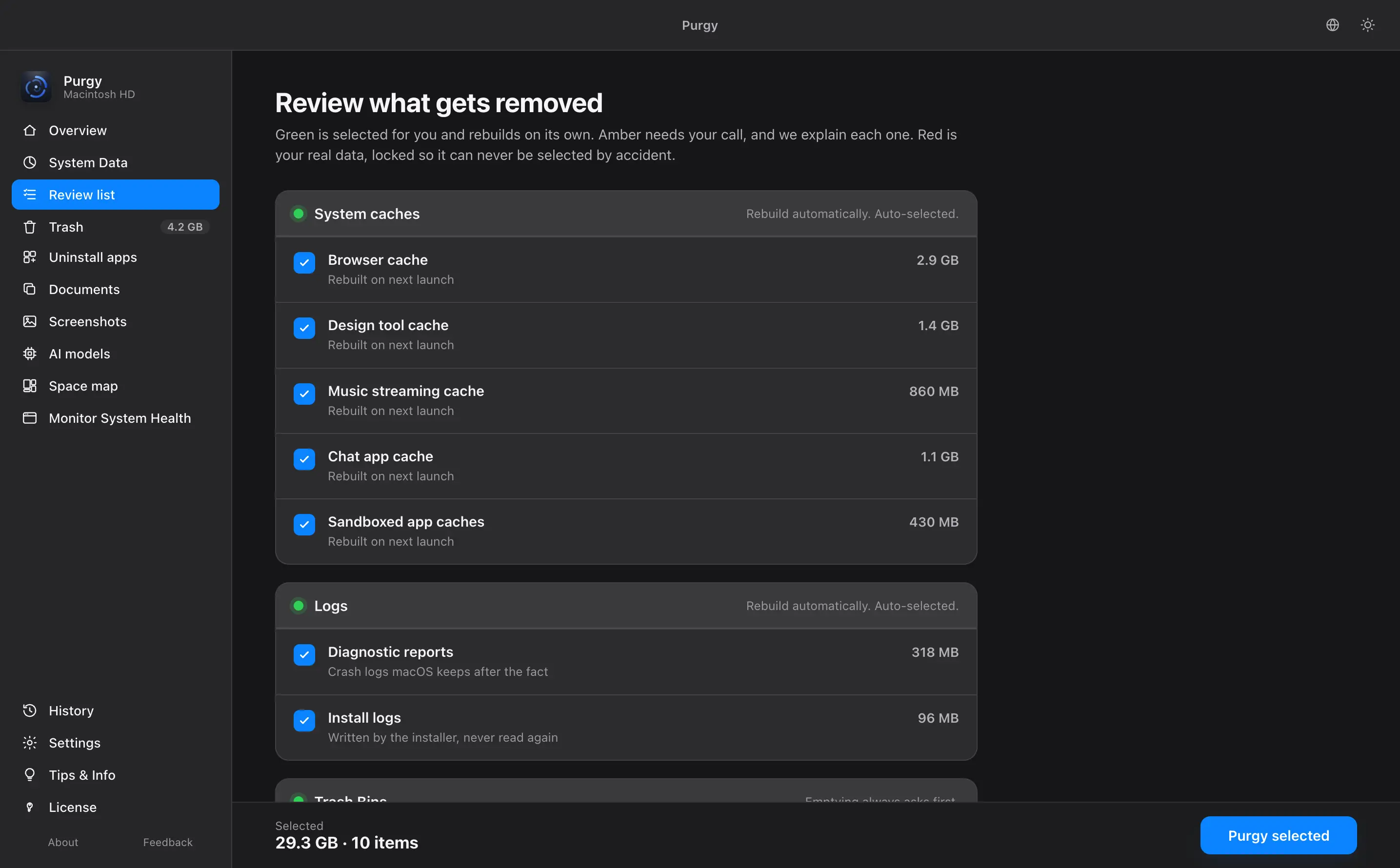
Purgy is smaller on purpose. It does one thing: it finds what is taking up space on your Mac and tells you exactly what each file is before anything is removed. It sorts everything into three groups. Safe items are caches and logs that macOS rebuilds. Review items are things you should decide on, such as large files and old downloads. Locked items are your own documents, photos and projects, which Purgy will not select for you.
Its tools include a one-click clean, a System Data breakdown, an uninstaller that removes leftovers, a space map, large file and duplicate finders, screenshot cleanup, a finder for local AI model files, and a menu bar shortcut. The guide walks through each one.
Price: this is the biggest difference
Purgy costs $20, once, for 3 Macs. There is no account and no renewal date, and updates are free for as long as you own it. The pricing page lists exactly what is included.
CleanMyMac sells two ways. According to third-party listings, a yearly subscription starts at about $40 for one Mac, and a one-time license starts at about $120. Prices go up for more Macs, and MacPaw runs sales. Older reviews also mention that a one-time license may not include every future major version, so read what the license covers before you pay.
| Time you keep it | Purgy | CleanMyMac, subscription (about) |
|---|---|---|
| First year | $20 | $40 |
| Three years | $20 | $120, if the price holds |
| Macs covered | 3 | 1 at the entry price |
CleanMyMac figures are rounded from the sources below and will change. Confirm the current price on the vendor's site.
The gap is bigger if you own more than one Mac, because Purgy's single price already covers three. It is smaller if you only need a cleaner for one year and then cancel.
How each one handles deletion
This is the part that matters most, because a cleaner can remove things you wanted to keep.
With Purgy, you see the file, its size and the reason it was flagged. You can untick anything. Approved files go to the Trash by default, so Finder can put them back. Permanent delete exists as a separate button, because items in the Trash still use disk space, and it is never selected for you. You can also add any folder or drive to a protected list and Purgy will not open it.
We have not tested how CleanMyMac presents its results in the current version, so we are not going to claim it does less than Purgy here. If this matters to you, try both on a Mac with a backup and compare what each one lists before it cleans.
Where CleanMyMac is better
- It does more. Malware scanning, maintenance tasks, a health assistant and other extras sit in one app.
- It has a long track record. It has been developed for years by a large company, and it is widely reviewed.
- It suits people who want one button. If you do not want to read a list, a guided, automated flow is easier.
Where Purgy is better
- You pay once. $20 for 3 Macs, with free updates and no renewal.
- It names every file. You see what each item is and why it was flagged, and your own files are locked.
- It explains System Data. It measures inside that block and tells you what is in it. Our guide to clearing System Data shows what is usually in there.
- It does not promise speed. Clearing space frees disk room. It will not make a healthy Mac faster, and Purgy says so on its own pages.
- It is small and simple. One focused job, no account, and a menu bar shortcut for quick clean-ups.
Malware scanning: what you should know
CleanMyMac includes a malware scanner. Purgy does not. Purgy is a cleaner, not an antivirus, and we think it is better to say that than to bolt on a feature we would not stand behind.
macOS also protects you on its own. XProtect and Gatekeeper check the software you open, and Apple explains the system in its platform security guide. Many Mac users find that enough, and others like a second opinion. If you want one, that is a fair reason to choose CleanMyMac.
Who should pick which
Pick Purgy if you
- want to see what each item is and why it was found
- prefer a one-time price with no renewal
- have two or three Macs to cover
- mainly need storage back, not a security suite
Pick CleanMyMac if you
- want malware scanning in the same app
- like guided maintenance and reports
- do not mind paying yearly
- want a long-established vendor
How to decide without risk
You do not have to guess. Make a Time Machine backup first. Then run each app's trial and compare what it finds on your own Mac. Purgy's3-day trial has every feature on and needs no card, and you can start it on the free trial page. If you buy and it is not for you, there is a 7-day refund window, described in the refund policy.
Still unsure whether you need a cleaner at all? Read how to check what is in System Data by hand, and see how Purgy stacks up against the tools already built into macOS.
Weighing more than these two? CleanMyMac alternatives compares six options, free and paid.
Sources
Common questions
Is Purgy a good CleanMyMac alternative?
If you mainly want to free storage, decode System Data and remove apps with their leftovers, yes. Purgy covers those jobs for $20 once. It does not include malware scanning, so it is not a full replacement for a suite.
How much does CleanMyMac cost?
Third-party listings show a yearly subscription from about $40 and a one-time license from about $120, with higher prices for more Macs. Plans and prices change, so confirm them on the MacPaw website before you buy.
Does Purgy scan for malware?
No. Purgy is a cleaner, not an antivirus. macOS has its own built-in protections, XProtect and Gatekeeper. If you want a separate malware scanner, CleanMyMac includes one.
Will Purgy delete my documents or photos?
Not on its own. Your documents, photos and projects are locked and cannot be selected automatically. Anything you approve goes to the Trash by default, and permanent delete is a separate button that is never pre-selected.
Can I try Purgy before I buy it?
Yes. There is a 3-day free trial with every feature, and no card is needed. If you buy and change your mind, there is a 7-day refund window.
Can I run Purgy and CleanMyMac on the same Mac?
You can install both, but there is little reason to run them one after the other. Pick one cleaner, and use the other only to compare what each finds.