CleanMyMac alternatives: six options, compared honestly.
Whether you want to stop paying every year, need something simpler, or just want to see what a cleaner deletes before it does, here are the options and who each one suits.
On this page
- Why people look for a CleanMyMac alternative
- At a glance
- 1. Purgy: a full cleaner you pay for once
- 2. DaisyDisk: see where your space went
- 3. AppCleaner: remove apps, free
- 4. OnyX: free maintenance for confident users
- 5. macOS Storage settings: already on your Mac
- 6. Pearcleaner: free uninstaller, with a caveat
- Which one should you pick?
- How to switch away from CleanMyMac
- Sources
- Common questions
- More comparisons
If you want to stop paying a subscription but keep a full cleaner, Purgy is$20 once for 3 Macs and shows every file before it goes. If you only need to remove apps, AppCleaner is free. If you want to see what fills your disk and delete things yourself,DaisyDisk is about $10 once.
Why people look for a CleanMyMac alternative
Most reasons fall into three groups:
- The price over time. Third-party listings show CleanMyMac at about $40 a year for one Mac, or a one-time license from about $120. Over a few years, a subscription adds up.
- More than they need. CleanMyMac bundles cleaning with malware scanning, performance tools and more. Some people only want their disk space back.
- Wanting to see what goes. A total such as "12 GB found" tells you little. Some people want a list of each file, with the reason it was picked, before anything is removed.
At a glance
| App | Price | Clears caches | Removes apps | Disk map | macOS 27 |
|---|---|---|---|---|---|
| Purgy | $20 once, 3 Macs | Yes | Yes, with leftovers | Yes | Yes |
| DaisyDisk | About $10 once, up to 5 Macs | You delete by hand | No | Yes, its main feature | Not confirmed |
| AppCleaner | Free | No | Yes, with leftovers | No | Not confirmed |
| OnyX | Free | Yes | Yes | No | Yes, Apple silicon only |
| macOS Storage | Free, built in | Limited | Yes, one at a time | Bar chart only | Yes |
| Pearcleaner | Free | Some developer files | Yes, with leftovers | No | Not listed; development on hold |
| CleanMyMac, for reference | About $40 a year, or about $120 once | Yes | Yes | Yes | Not confirmed |
Checked October 2026 against each app's own pages and public listings. "Not confirmed" means we could not verify it from public sources. Prices and support change, so check the vendor before you buy, including us.
1. Purgy: a full cleaner you pay for once
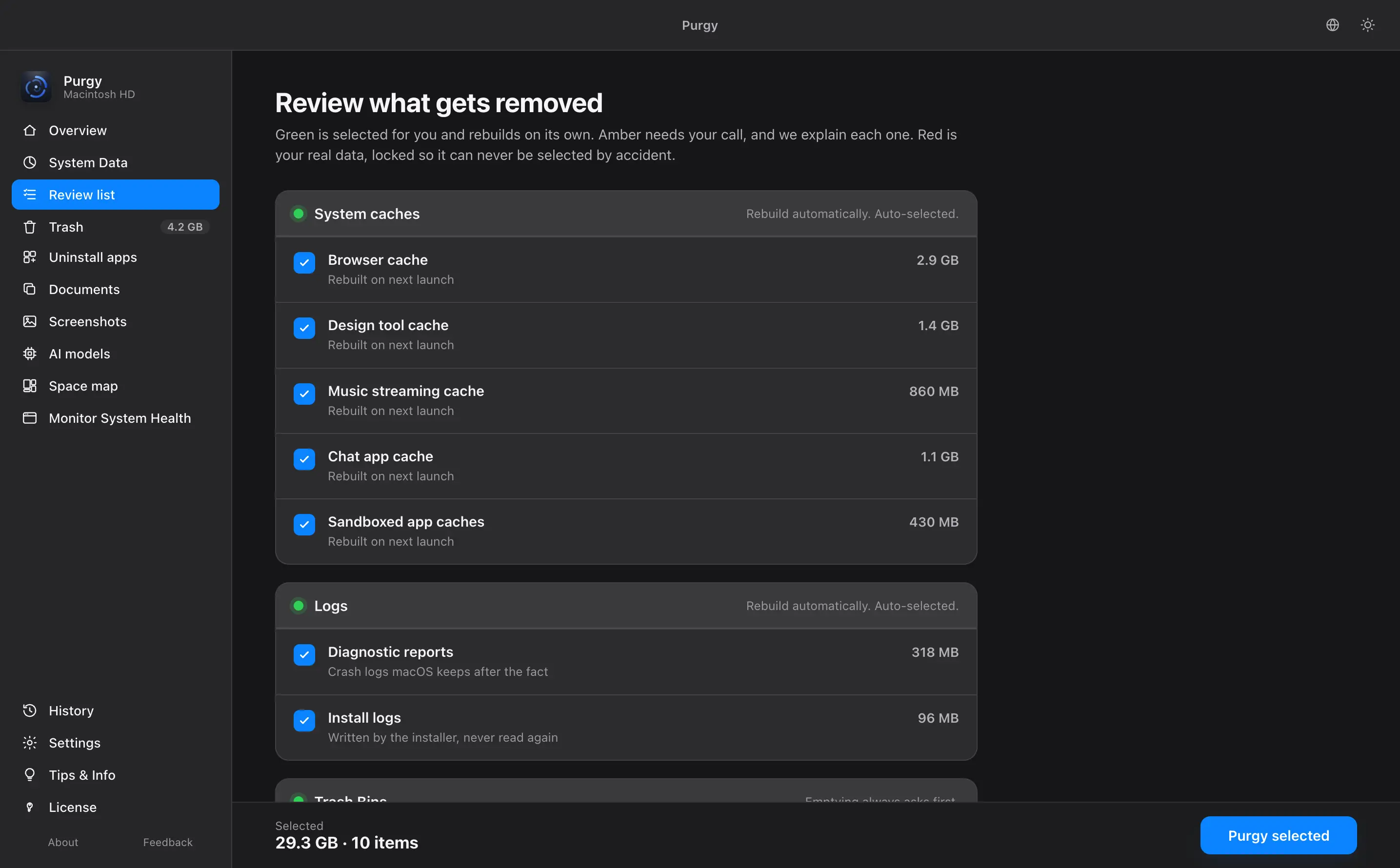
Purgy clears caches, app leftovers and System Data, removes apps completely, and maps your disk. Before anything goes, it lists each file with its size and the reason it was found, and what you approve goes to the Trash first. It also finds downloaded AI models and hidden folders, which are often the biggest wins on a modern Mac.
Good for: people who want a full cleaner without a subscription, and who want to see what is removed. Watch out for: it does not scan for malware. macOS has its own protection for that.
2. DaisyDisk: see where your space went
DaisyDisk draws your disk as a map, so the biggest folders stand out, and lets you drag what you want to delete into a collector. It is cheap and well liked. It does not decide what is safe to clear: that part is up to you.
Good for: people who know what they are looking at and want a clear picture.Watch out for: it will not find caches or leftovers for you. ReadPurgy vs DaisyDisk.
3. AppCleaner: remove apps, free
AppCleaner, from FreeMacSoft, removes an app together with the support files it left behind. It is free, small and has been around for a long time.
Good for: removing apps properly, and nothing else. Watch out for: it does not clear caches or System Data. ReadPurgy vs AppCleaner.
4. OnyX: free maintenance for confident users
OnyX, made by Titanium Software since 2003, clears caches, rebuilds system databases, runs maintenance tasks and can remove apps. It is free, and accepts donations. Each version is built for one macOS release, and the current one needs an Apple silicon Mac on macOS 27.
Good for: technical users comfortable with maintenance settings.Watch out for: it is a toolbox rather than a guided cleaner, and it will not tell you what is safe to delete in your own files.
5. macOS Storage settings: already on your Mac
The Storage section of System Settings shows what uses your disk, suggests a few clean-ups, and lets you remove apps and large files. It is free and built in, so it is the right place to start.
Good for: a first look, with nothing to install. Watch out for:System Data appears as one large total with no breakdown. ReadPurgy vs macOS Storage.
6. Pearcleaner: free uninstaller, with a caveat
Pearcleaner is a free uninstaller that also searches for files left by apps you already removed. It is widely recommended. Before you install it, know two things: its developer has put development on hold indefinitely, and its listed support stops at macOS 26. It is source-available under a license that forbids selling it, rather than fully open source.
Good for: removing apps on an older macOS, for free. Watch out for: without updates, it may not keep up with new macOS releases.
Which one should you pick?
Purgy is a full cleaner for $20 once, with free updates.
AppCleaner is free and does that one job well.
DaisyDisk draws a clear map. You do the deleting.
OnyX is free and thorough, if you are comfortable with its settings.
How to switch away from CleanMyMac
- Cancel the subscription first. Do it through MacPaw's account page or the App Store, depending on where you bought it. Removing the app does not cancel it.
- Quit CleanMyMac fully, including its menu bar helper.
- Remove the app with its leftovers. Dragging it to the Trash leaves support files behind. An uninstaller catches those.
- Try the alternative. Purgy's 3-day free trial has every feature and needs no card.
For a side-by-side of just the two, read Purgy vs CleanMyMac. For every comparison in one place, see the Mac cleaner comparison.
Sources
Common questions
What is the best free CleanMyMac alternative?
It depends on the job. AppCleaner is free and removes apps along with their leftover files. OnyX is free and clears caches and runs maintenance tasks. The Storage section of System Settings is built into macOS and costs nothing. None of them explains System Data or shows a safe and risky split the way a full cleaner does.
Is there a CleanMyMac alternative without a subscription?
Yes. Purgy is $20 once for 3 Macs, with free updates and no renewal. DaisyDisk is a one-time purchase of about $10. AppCleaner and OnyX are free.
Do I need a Mac cleaner at all?
Not always. macOS clears some caches by itself, and the Storage section of System Settings handles the basics. A cleaner helps when your disk is full and you cannot tell what is filling it, especially System Data, old backups, developer files or downloaded AI models.
How do I remove CleanMyMac before trying something else?
Cancel the subscription first, through MacPaw or the App Store, depending on where you bought it. Then quit CleanMyMac, including its menu bar helper, and remove the app. An uninstaller such as AppCleaner or Purgy will also catch the support files it leaves behind.
Does Purgy work on macOS 27?
Yes. Purgy 1.1.3 is built for macOS 27 and tested on it, and it runs on macOS 12 Monterey and later.